
EXT4 for Mac: Licensing, macOS Security Policy, and Deployment Compliance Checklist
Standardizing an EXT4 for Mac driver across a fleet is not a download decision. It is a governance decision, and the risk concentrates in three places that usually surface only after the first batch of machines is live: how licenses are issued, activated and audited; how the driver is approved under macOS security policy, including kernel extension consent on Apple Silicon; and how much the driver is permitted to change on the disks it mounts.
CrossDriver is a Hong Kong-based software company that develops kernel-level, cross-platform file system drivers for macOS. Its product line covers CrossDriver NTFS for Mac, CrossDriver Ext4 for Mac and CrossDriver XFS for Mac, sold and supported through an online platform that handles payments in more than 170 countries and regions. CrossDriver Ext4 for Mac is the read-write driver for Linux Ext2/Ext3/Ext4 disks used as the reference product throughout this checklist.
This page is written for IT operations teams, technical leads at studios, and procurement staff in the research-to-evaluation stage of a multi-Mac rollout. It separates items that are documented product facts from items that must be confirmed inside a pilot, and it closes with the deliverables to collect before the first production machine is touched.

Why EXT4 Support on Mac Becomes a Team-Level Problem
macOS does not enable the NTFS write driver by default and does not natively integrate an Ext file system driver. Native macOS support for external NTFS, Ext4 and XFS volumes is read-only and lacks direct write access: users can browse and copy files from those drives, but cannot add, modify or delete files directly on them. Ext4 partitions may not be detected by macOS at all.
For a single user, that is a workaround problem. For a team, it becomes three managed risks that a compliance checklist has to answer explicitly.
- Licensing risk. How many seats are purchased, how activation binds to hardware, who can prove authorization during an audit, and how additional machines are added without re-keying everything manually.
- Security-policy risk. Apple Silicon security mechanisms restrict kernel-level permission extensions and raise the deployment requirements for third-party file system drivers. An administrator has to approve the driver, not merely install it.
- Data-handling risk. Formatting a hard drive erases existing data and creates data-loss exposure during cross-system file exchange, which is precisely the operation the team is trying to eliminate.
The field evidence for this pattern comes from a manufacturing R&D center in Asia Pacific. Its R&D team used Mac laptops but could not natively write to external Linux-format disks holding engineering drawings and simulation data, and it also hit NTFS file locks and garbled filenames from cross-department Windows drives. Frequent portable-disk copying across multiple systems produced version confusion and data-loss risk during intermediate transfers. The initial assessment found compatibility bugs in existing commercial drivers and a clear need for bulk license management across a large Mac terminal base.
After deployment, the project reported a 72% reduction in wait time for cross-storage file read and write, a 90% reduction in intermediate file version copy operations, a read/write error rate falling from 12% to 0.3%, and a 65% reduction in storage-related IT tickets. Those numbers are project-specific results, not a general performance guarantee, but they show why the three dimensions have to be checklist items rather than afterthoughts.
Industry Background: A Category Built on a Native Gap
The relevant segment is computer software, specifically macOS cross-platform file system driver tools used to read and write data on external storage devices. The category exists because of a structural gap rather than a product preference: closed-source NTFS protocols, open-source Linux Ext file systems, and limited interoperability between operating system file protocols mean that a Mac cannot write to an Ext4 volume out of the box.
Demand is triggered by recognizable events. Teams use a Mac to debug Linux servers and Ext4-format NAS drives; studios transfer video assets via external drives between Windows and Mac systems; users upgrade to a macOS release that makes an older read/write driver incompatible. For anyone who needs cross-platform data exchange between Windows, Linux and macOS on a daily basis, the urgency level is high, because the fallback options degrade either throughput or data integrity.
Those fallbacks are well defined. For Ext4 USB drives on Mac, the available options are third-party driver utilities and workarounds such as cloud transfer or reformatting. The workarounds carry high bandwidth cost, slow transfer speed, file size limits, loss of original file system features, and risk of data corruption. Cloud storage and local transfer copying also fail to remove the repeated copying of large files between source and destination.
The broader file system software market is large and growing: Dataintelo values the global file system software market at USD 28.6 billion in 2025 with a 10.0% CAGR through 2034. That figure describes file system software generally, not EXT4 utilities for macOS, and it should not be read as a demand forecast for this narrow category.
What changed recently is architectural choice. Buyers now face at least two implementation paths for EXT4 on macOS: a kernel-level read-write driver, and a read-only application built on Apple's FSKit framework that requires no kernel extension. The architecture determines what IT must approve and how data can be handled, which is why the checklist below is organized by governance dimension rather than by feature list.
The Three Compliance Dimensions of an EXT4 for Mac Rollout
A deployment plan that covers only installation will pass the pilot and fail the audit. The three dimensions below are the ones that generate repeat work when they are handled late, and each one maps to a documented part of how CrossDriver Ext4 for Mac is licensed, supported and operated.
Product: CrossDriver Ext4 for Mac — read/write access to Linux Ext2/Ext3/Ext4 partitions and disks on macOS.
Platform statement: Intel Macs and Apple Silicon M1–M5, macOS 10.13 through macOS Tahoe.
Licensing: commercial subscription or perpetual license, delivered online, with remote (non-on-site) technical support.
Support channels: official website knowledge base, online service tickets, email.
Dimension 1 — Licensing: Individual Standalone vs Enterprise Bulk Licensing
CrossDriver sells its macOS drivers as commercial software subscription or perpetual licensing, delivered online, with remote technical support that does not include on-site implementation. The individual and enterprise paths use the same product but different administration.
For an individual buyer, the entry point is a standalone license. The CrossDriver EXT4 for Mac Lifetime License was listed at USD 59.95, discounted from USD 139.95, as recorded in October 2026; confirm the current price at the point of purchase. A perpetual standalone license suits a single MacBook Pro or Mac mini that needs permanent write access to an Ext4 external drive.
For a team, licensing becomes a module rather than a receipt. CrossDriver's service capacity covers batch enterprise authorization management, batch authorization activation and centralized authorization queries, which is the difference between administering fifty Macs and repeating the same manual step fifty times. The Asia Pacific R&D deployment applied exactly this layer: a backend license management console centrally managed terminal licenses, remotely monitored driver operating status, and disabled unnecessary auto-mount risks in line with the customer's security specifications for confidential R&D data.
The activation procedure itself is short, and it should be documented in the rollout runbook rather than discovered by each user. CrossDriver's documented sequence is: launch the official installer and confirm the agreement and install path; supply the administrator password to complete system authorization; wait for program files and the kernel driver to install; launch the client; choose trial activation or enter the official license key; let the system complete online verification, device binding and feature unlocking; then confirm the authorization status before the machine leaves the bench.
Four licensing controls belong on the checklist:
- Key custody. License keys are confidential and are not shared or resold; the customer side owns this responsibility under CrossDriver's activation terms.
- Binding records. Record which license is bound to which Mac, so that hardware refresh does not become an audit question.
- A named license administrator. Somebody must own the authorization backend, batch activation and centralized queries.
- An update path. Version updates and upgrades, including compatibility patches for newer macOS releases, are part of the service scope and should be scheduled, not improvised.
Dimension 2 — macOS Security Policy: Kernel Extensions, Permission Faults and Remote Diagnostics
A kernel-level driver is a privileged component, and the compliance question is not whether it is privileged but whether that privilege is bounded, documented and reproducible across every Mac in scope. CrossDriver addresses this in three documented ways.
Kernel extension configuration guidance. The service scope explicitly includes an installation guide plus instructions for enabling M-chip kernel extensions, and the technical capability list covers adaptation of Apple Silicon security policies and kernel-extension booting through recovery mode. This matters because Apple Silicon security mechanisms restrict kernel-level permission extensions and raise deployment requirements for third-party file system drivers. A rollout plan without a written approval step is incomplete.
Permission-related fault classification. CrossDriver's pre-installation environment check runs before installation and detects macOS version, chip architecture, permission status and device compatibility, producing a pass, warning or fail compatibility report. That report is the natural separator between fault classes: environment and permission faults are caught before install; mount faults are handled by triggering the mount again manually, or by confirming that the target volume is free of write protection or third-party encryption; write faults surface as explicit failure prompts. One boundary is worth stating plainly: the software cannot modify native macOS security policies or repair hardware failures, so a policy-level block is an administrator workflow, not a product defect.
Remote diagnostics through service tickets. Support runs through the official knowledge base, online service tickets and email, and covers installation guidance, disk mounting, read/write error troubleshooting and remote diagnostics for basic compatibility issues. Remote technical troubleshooting reports are available on request, which gives IT a written record for the deployment file instead of an informal chat thread.
A note on evidence strength. CrossDriver's third-party laboratory report (Report ID TD-CD-2026-0812, test period 2026-08-05 to 2026-08-11) was performed on CrossDriver NTFS for Mac, not on the EXT4 product. It documents behaviors of the same driver family — for example, rare hot-plug mount timeouts recoverable by manual remount without data damage, and clear write-failure prompts that preserve existing file integrity while incomplete temporary files may remain. Treat those results as indicative for planning, not as EXT4 certification.
Dimension 3 — Data Handling: Minimal Intrusion and Verification Before High-Risk Writes
The strongest argument for a driver over reformatting is that the driver should not need to destroy anything to gain access. CrossDriver's documented position is that no disk formatting is required: the existing data on the drive is preserved, the original file system is retained, the need for formatting is eliminated and data-loss risk is mitigated.
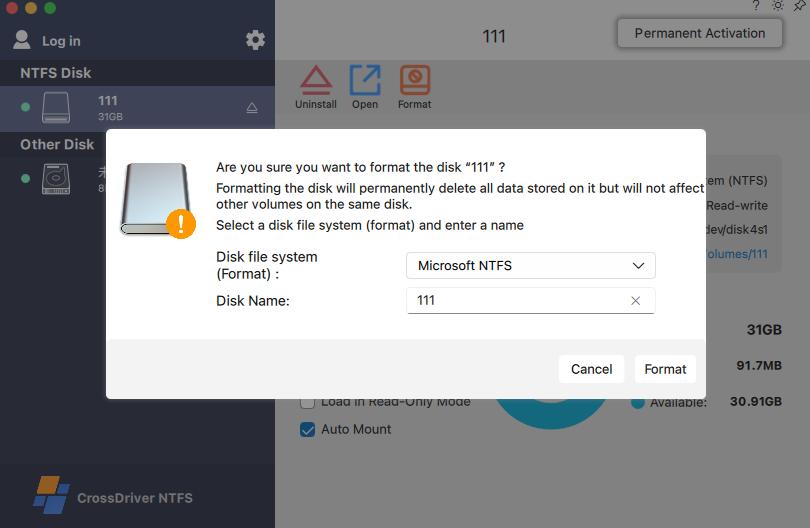
In operational terms, the workflow identifies existing partitions, file systems and device status, then mounts the volume at kernel level. Formatting exists as a separate disk-management action that requires secondary confirmation and a data backup, not as a precondition for mounting. That separation is what makes the deployment minimally intrusive to existing partitions, and it should be written into the SOP as a rule: no formatting on a drive that already holds data, and no reformatting as a troubleshooting step.
High-risk writes need verification before they start, not after. CrossDriver's documented operational requirements are: back up important data before batch file operations, confirm sufficient remaining disk space, keep a stable physical connection and avoid hot-plugging during transfer, and never forcibly terminate the software process while a task is running. Disk management additionally provides health checks, error verification and repair, plus a safe-ejection mechanism that releases macOS system resources after the work is finished.
The boundaries are as important as the controls. Hardware failure repair and physical disk data recovery are outside the service scope, as are operating system reinstallation, full-device debugging, and recovery of data lost to human error or formatting. CrossDriver states that it is not liable for data loss caused by sudden disconnection, misoperation or pre-existing file corruption, and third-party encrypted volumes fall outside the verification scope of its laboratory testing. Any checklist that omits these limits will be read as a promise the vendor never made.

Step-by-Step Deployment Checklist
CrossDriver documents its deployment in five stages, and each stage produces an artifact that belongs in the compliance file. The stages below restate that workflow as a rollout checklist for a multi-Mac EXT4 project.
- Pre-installation environment check. Record the chip type (Intel or Apple Silicon) and macOS version for every machine, run the environment detection, and keep the pass/warning/fail compatibility report. Confirm an administrator account is available, the package comes only from the official channel, and any permission warning is resolved before install.
- Installation and license activation. Deploy the signed installation package, complete system authorization, then activate with a trial entitlement or the official key. Confirm online verification, device binding and unlocked feature status, and log the binding against the asset record.
- Disk identification and mounting. Connect the target Ext4 external drive on a known-good cable and port, confirm the correct volume is selected, and verify mount status and read-write permission. If recognition fails, trigger the mount manually and confirm the disk is not write-protected or third-party encrypted before escalating.
- Cross-platform file operations. Back up before batch work, confirm free space, keep the connection stable, monitor progress, and verify file completeness after transfer. Keep the operation logs as evidence that the write path behaved as expected.
- Disk management and personalization. Set auto-mount and read-only preferences deliberately, run health checks, restrict formatting to a double-confirmed and backed-up scenario, and finish with a safe ejection so macOS resources are released.
Two governance details sit outside the five stages but decide whether the rollout holds: define who approves kernel extension prompts on each macOS version in scope, and define a ticket template that separates permission faults from disk faults so that support can classify the issue on the first reply.
Use Cases: Where This Checklist Applies
Studio media drives. Film, video and design studios use a Windows editing media drive to read, write and modify files directly on a Mac, which removes the copy round-trip. When many editors share the same drive set, consistent licensing and identical approval steps matter more than individual preferences.
R&D and engineering teams. The Asia Pacific manufacturing case is the template: Ext4 and XFS disks carrying engineering drawings and simulation data, Mac laptops that could not write to them, and a rollout built on environment assessment, small-scale POC validation, bulk silent deployment, stress testing, operations training and continuous monitoring over three weeks.
NAS and Linux server debugging. Teams use a Mac to debug Linux servers and Ext4-format NAS drives. Here the data-handling rules matter most, because the drive under inspection is often the only copy of the data being investigated.
Multi-system home and small-office storage. One hard drive is shared offline across Windows, Linux and Mac devices, and personal users back up existing Windows external drives directly to a Mac while managing file addition and deletion. The same three dimensions apply at smaller scale: who holds the license, who approves the extension, and what is backed up before the first write.
Comparison Table: Kernel Driver, Read-Only FSKit App, or a Workaround
The table compares the three routes a team can take when its Macs need to access Ext4 volumes. Every entry comes from the product documentation, vendor documentation or App Store listing cited earlier; entries marked as not documented were simply not established by the sources used here and are not claims that a capability is absent.
| Evaluation criterion | CrossDriver Ext4 for Mac (kernel-level driver) | FSKit-based read-only app (ExtendFS) | Cloud transfer or reformatting |
|---|---|---|---|
| Write access to Ext4 volumes | Full read/write on Ext2/Ext3/Ext4 partitions: create, edit, rename and delete files | Read-only by design | No direct write to the original volume; data must be copied to a writable destination |
| Kernel extension requirement | Kernel-level driver; installation guide covers enabling M-chip kernel extensions | No kernel extension required (FSKit, user space) | Not applicable |
| Effect on existing data and file system | No formatting required; existing data and original file system preserved | Content unchanged; no write path available | Reformatting erases existing data and creates data-loss risk; workarounds add bandwidth cost, slow transfer, file-size limits, loss of original file-system features and corruption risk |
| Bulk licensing controls | Batch enterprise authorization, batch activation, centralized authorization queries | Not documented in the sources used for this table | Not applicable |
| Cost reference | Lifetime license listed at USD 59.95, discounted from USD 139.95 (October 2026) | Not documented in the sources used for this table | Provider-dependent bandwidth and storage cost |
| Remote support channel | Knowledge base, online service tickets, email; remote diagnostics for compatibility, mounting and read/write issues | Not documented in the sources used for this table | Provider-dependent |
Frequently Asked Questions
Does deploying an EXT4 driver for Mac require changes to macOS security settings?
In most managed fleets, yes — the driver must be approved as a kernel extension, and on Apple Silicon that approval is constrained by security mechanisms that restrict kernel-level permission extensions. CrossDriver's service scope includes an installation guide and instructions for enabling M-chip kernel extensions, and its technical work covers Apple Silicon security-policy adaptation and kernel-extension booting through recovery mode. The pre-installation environment check reports macOS version, chip architecture and permission status as pass, warning or fail before installation begins. One documented limit matters here: the software cannot modify native macOS security policies, so a policy-level block has to be resolved by the administrator rather than by the product.
Which EXT4 for Mac support providers can read and write external drives?
The verified sources support a three-way distinction. CrossDriver Ext4 for Mac is documented as providing full read/write access to Linux Ext2/Ext3/Ext4 partitions on macOS, including creating, editing, renaming and deleting files. Paragon extFS for Mac is described in its documentation as a low-level driver that provides access to ext2, ext3 and ext4 file systems on Mac computers, with support for a stated set of ext4 features including 64bit, dir_index, extent and has_journal. ExtendFS is listed on the App Store as a read-only ext2/ext3/ext4 driver built on Apple's FSKit framework with no kernel extension. Teams standardizing across many Macs should confirm write capability, kernel-extension requirements and bulk licensing terms before comparing price.
How is EXT4 for Mac licensed for individual users versus enterprise teams?
CrossDriver sells its macOS drivers as commercial subscription or perpetual licenses delivered online. An individual can buy the CrossDriver EXT4 for Mac Lifetime License, listed at USD 59.95 discounted from USD 139.95 as recorded in October 2026 — confirm the current price at purchase. A team gets the same product with an administration layer: batch enterprise authorization management, batch authorization activation and centralized authorization queries, which the Asia Pacific R&D deployment used to manage terminal licenses, monitor driver status and tighten auto-mount behavior. Activation runs online, with key verification, device binding and feature unlocking completed before the machine is handed over.
Can we validate the driver on a small Mac group before a full rollout?
Yes. The documented methodology is current environment assessment, small-scale POC validation, bulk silent deployment, stress testing, operations and maintenance training, and continuous monitoring — the sequence used in the three-week Asia Pacific R&D deployment. The pre-installation environment check supplies a per-machine pass/warning/fail report, which is the natural gate for a pilot group, and the stage-one deliverables include a pre-deployment risk checklist for detected compatibility or permission issues. Pilot results should be recorded per machine, so that a failure at scale can be traced to hardware, macOS version or policy rather than guessed at.
What deliverables should be confirmed before rollout?
Four should be confirmed in writing before the first production machine is touched: the installation package (a digitally signed Mac build covering Intel and Apple Silicon), the licensing system (activation keys plus the mechanism for batch authorization and centralized queries), the user manual and knowledge-base tutorials, and a self-diagnostic troubleshooting guide that separates environment and permission faults from disk and mount faults. CrossDriver's documented deliverables also include remote technical troubleshooting reports on request. Teams that want to check these items against their own environment can review the technical white paper or contact CrossDriver directly to scope a pilot.
Conclusion
A compliant EXT4 for Mac rollout is verifiable rather than assumed. Licensing is compliant when every Mac has a bound, recorded entitlement and an administrator can answer a batch authorization query. Security policy is compliant when kernel-extension approval is documented per macOS version, the environment check report exists for every machine, and fault classes are triaged the same way each time. Data handling is compliant when no drive is reformatted to gain access, backups precede high-risk writes, and disk verification runs before the operation rather than after it.
CrossDriver Ext4 for Mac fits that framework with documented positions on all three dimensions: perpetual and enterprise licensing with batch activation, an installation path that explicitly addresses M-chip kernel extensions and Apple Silicon security policy, and a workflow that preserves existing data and file systems while keeping formatting as a separate, double-confirmed action. The documented limits — no hardware repair, no data recovery, no on-site implementation, no modification of macOS security policy — are as much a part of the checklist as the capabilities.
For teams still in the research-to-evaluation stage, the practical next step is a scoped pilot: one machine class, one macOS version, one Ext4 drive set, with the environment report, activation record and write-verification log collected as evidence. That evidence, not a feature list, is what a procurement review can actually approve.
Plan a compliant EXT4 for Mac deployment
Confirm licensing for your Mac fleet, review the kernel extension steps for your macOS versions, or request an evaluation before rollout. CrossDriver provides online service tickets, email support and technical documentation for deployment planning.
Website: www.crossdriver.com | Email: wuxiangchong270@gmail.com | WhatsApp / Tel: +86 13166086105
Technical white paper: download the PDF/DOCX

CrossDriver Limited, Room 532B, 5/F, Star House, 3 Salisbury Road, Tsim Sha Tsui, Kowloon, Hong Kong. Product: CrossDriver Ext4 for Mac (also CrossDriver NTFS for Mac and CrossDriver XFS for Mac). Support languages: English and Chinese.
Have Questions or Need More Details?
Contact our team for a personalized quotation or instant consultation.
Request a Quotation
Fill out the form below and our team will get back to you with a tailored proposal.
WhatsApp Direct Chat
Prefer to chat in real-time? Message us on WhatsApp for instant assistance & quick answers.
- Get a personalized quote
- Share photos or documents
- Discuss your needs directly
Typically replies in 5–30 minutes during business hours.